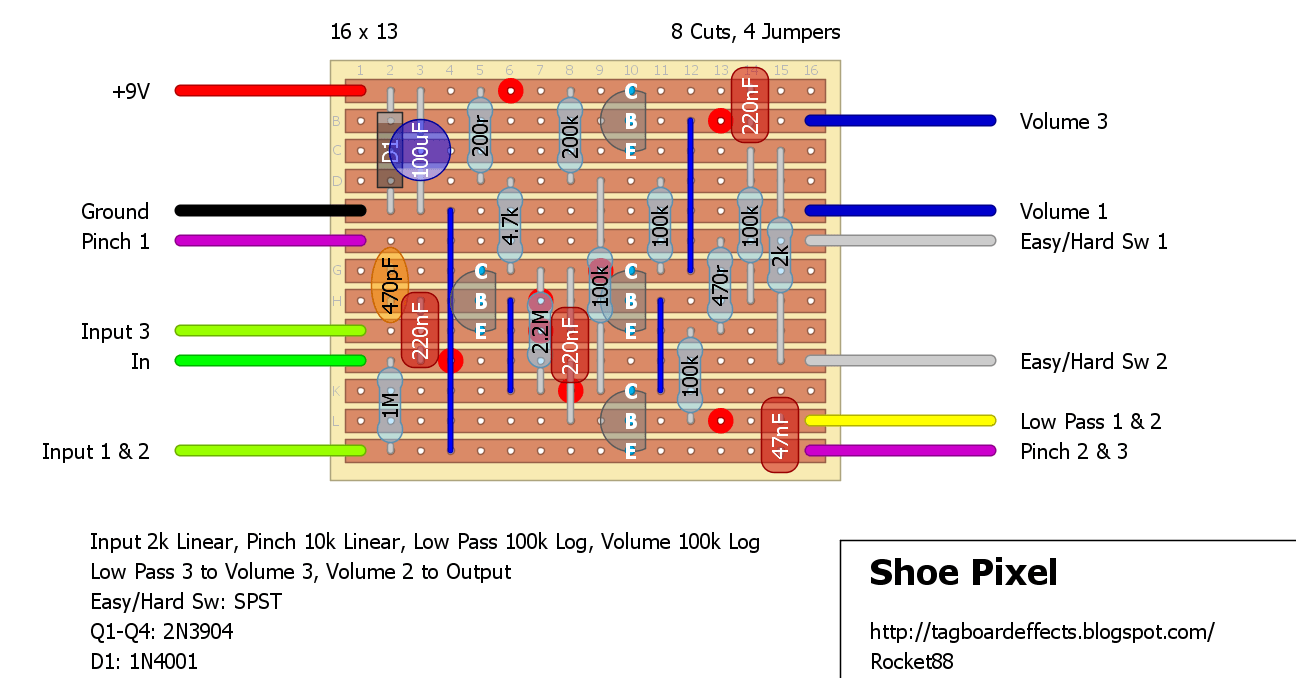
Interesting sounding 8-Bit fuzz, that’s not typically my type of pedal that I thought will get some love. Schematic is posted over at DIYSB.
From the source:
The Pixel
is one of the earliest SHOE designs. It began as an oscillating fuzz
and, after intentionally adding elements haphazardly and then adjusting
the circuit so the pedal began to work again, it turned into something
else entirely.
The Pixel is a gated fuzz and is commonly used
on bass, though it works quite well on guitar and other instruments.
When used with a guitar on single-note lines, the Pixel is adept at
producing chiptune and analog or 8-bit synthesizer type sounds. It can
resemble the sound of a classic monosynth or game console. This effect
is most pronounced at higher PINCH settings.
By turning up the PINCH knob, you will create a stronger gating
effect. Turn the control down and you will gain more and more sustain
until the pedal ceases to be gated and can move into some slightly more
traditional bass and guitar fuzz tones.
The Pixel is not, however, a pitch tracking effect as many synthesizer
emulators are. As a result, you can move seamlessly into highly
distorted chord playing simply by changing what you play.
Pixel on bass operates quite similarly, but bass notes will tend to
have longer sustain when played through the Pixel. By adjusting the
PINCH knob, you can also move between more open fuzz sounds or staccato
synth-like tones. Because of its popularity with bass players, the
current version of the Pixel features larger capacitor values at all
stages to let your thunderous low end through.
The Pixel also features a Low Pass control which is very useful in
dialing out upper harmonics. You can go from rather nasal to warm and
fat with this control.
There’s also a new feature on the latest version. That is the Easy
Mode/Hard Mode switch. This essentially lets you select from two
different versions of the Pixel circuit. The Hard Mode setting is quite a
bit louder than the Easy Mode setting, so be careful to turn down your
volume before switching!
The Pixel definitely takes a bit of practice to grasp and you will
likely need to adjust your playing style when playing it to achieve the
best sounds. This is OK, though. Some SHOE pedals are intended to
enhance your guitar and your existing playing. The Pixel is, more or
less, a different instrument and you should approach it as such. With
some creativity and the right mindset the experience is quite rewarding
both sonically and creatively. Use this pedal to write new types of
songs and go on new adventures!
Controls:
Volume (Top Left): Sets the output level of the pedal
Easy Mode/Hard Mode (Toggle Switch): Use
this to select between two different Pixel circuit versions. Hard Mode
is a bit tougher to master (and much louder) but greatly expands the
number of sounds available in the pedal (it’s based on the very first
Pixel). Play with the Pinch and Input Level knobs to get a number of new
synth-like sounds (Pinch all the way left and Input almost all the way
up is a personal favorite). Easy Mode is a bit more forgiving and has a
softer sound that can be tuned into a more traditional fuzz sound at low
Pinch and Input Level settings.
Input Level Adjustment (Top Right): Used
to adjust the level of signals coming into the pedal and can also be
used to “clean up” harsher attacks due to its built in mild low pass.
Low Pass (Bottom Left):
A simple tone control. Use it adjust how much treble is present in your
output signal. This control will never cut your bass frequencies.
Pinch (Bottom Right):
The heart of the pedal’s sound. Turn the pinch knob up for more
staccato and synth-like sounds. Turn it down for longer sustain and less
synth-like fuzz sounds.